Building EnvGuard: Catching Missing Environment Variables Before Runtime
How I designed and shipped a privacy-conscious TypeScript CLI that compares .env.example with .env, reports missing keys and returns CI-friendly exit codes.
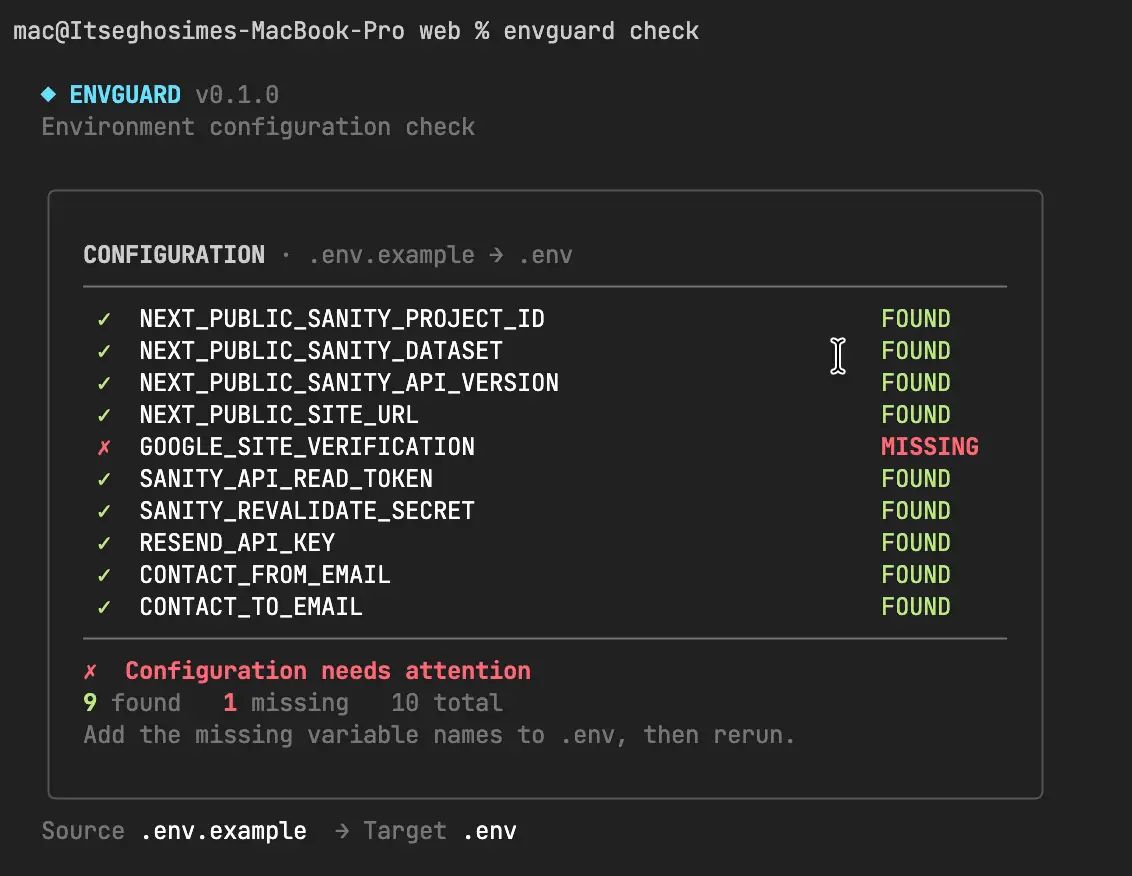
EnvGuard turns environment configuration checks into a concise, readable terminal report.
Environment variables are easy to overlook because they usually sit outside the main application code. A project may compile correctly and still fail at runtime because one required variable was never added to the local or deployed environment.
I built EnvGuard to make that failure visible earlier. It is a lightweight command-line tool that compares the variable names declared in .env.example with those present in .env, then produces a readable report showing what was found and what is missing.
The goal was not to build a complete configuration platform. It was to solve one narrow problem well: help developers identify incomplete environment configuration before it becomes a runtime error.
The problem I wanted to solve
An .env.example file communicates the configuration a project expects, while .env contains the developer’s actual local configuration. As projects grow, the two files can quietly move out of sync.
A newly added API key may exist on one developer’s machine but be absent from another. A deployment may be missing a service URL. Onboarding instructions may mention a variable that was later renamed. These mistakes are simple, but they can consume unnecessary debugging time because the visible error often appears far away from the real cause.
Configuration mistakes should fail early, clearly and without exposing the secrets they are checking.
That principle became the boundary for EnvGuard: compare variable names, communicate the result clearly and avoid printing environment-variable values.
Defining the first release
For the first release, I deliberately kept the scope small. EnvGuard checks one configuration relationship:
.env.example → .env
Read both environment files from the current working directory.
Parse valid environment-variable declarations.
Ignore comments and blank lines.
Recognize export KEY=value declarations.
Identify malformed declarations and invalid variable names.
Compare the required names with the configured names.
Display a readable terminal report.
Return an exit code that can be used by local scripts or CI.
This limited scope made the tool easier to reason about, test and release. It also left a clear boundary between what EnvGuard supports today and what could be added later.
A small, separated architecture
The implementation is separated into three main responsibilities: parsing, validation and presentation. The command layer connects them without making any one part responsible for the entire workflow.
The CLI resolves and reads .env.example and .env.
The parser extracts valid variable declarations and syntax diagnostics.
The validator compares expected names with the names present in the target file.
The reporter formats the result for the terminal.
The command returns exit code 0 when all required names exist and 1 when configuration needs attention.
Architecture
Each layer has one responsibility
01 / Parse
Understand declarations
Extract variable names, line numbers and safe diagnostics while handling comments, export syntax, duplicates and different line endings.
02 / Validate
Compare configuration
Compare the expected names with the configured names and produce a structured result containing found and missing variables.
03 / Report
Explain the result
Turn the validation result into a responsive terminal report with clear statuses, summaries and actionable error messages.
Parsing configuration without leaking values
Environment files can contain sensitive credentials, so the parser was designed around variable names rather than secret values. It records whether a declaration has a value, but it does not preserve that value in the parsed result.
When EnvGuard reports a malformed line containing an equals sign, everything after the equals sign is replaced with a mask. This allows the tool to explain where the syntax problem occurred without printing the original value.
Malformed declarations retain enough context to be useful, while their values are replaced before being included in diagnostics.
Handling real environment-file syntax
The parser handles comments, blank lines, Windows CRLF line endings, quoted values and values containing additional equals signs. It also supports declarations prefixed with export and records duplicate names without treating repeated declarations as separate requirements.
Variable names are validated using the familiar environment-variable identifier pattern: a letter or underscore followed by letters, numbers or underscores.
Keys containing spaces, hyphens or invalid starting characters are reported as syntax diagnostics.
Presence validation as a deliberate first step
EnvGuard currently validates presence rather than value correctness. If a name appears in .env, the first release considers that variable present even when its value is empty.
The internal model already records whether a target variable contains a non-empty value, but that information is not yet used to fail validation. Keeping that distinction explicit avoids presenting the current release as more capable than it is.
Current boundaries
What EnvGuard checks—and what it does not
Supported
Variable presence
EnvGuard identifies names declared in .env.example that are absent from .env and reports them as missing.
Not yet
Value correctness
The current release does not require non-empty values or validate formats such as URLs, numbers, booleans or tokens.
Not yet
Framework-aware files
The current release does not automatically inspect .env.local, environment-specific files or custom paths.
Designing the terminal experience
A command-line tool still needs a considered interface. EnvGuard uses colour, alignment and short status labels to make the report scannable without turning it into a wall of debug output.
The report adapts to the available terminal width, truncates exceptionally long names when necessary and presents a summary of found, missing and total variables. Errors such as missing files and unknown commands use the same visual language as the main report.
CODE / Terminal
1◆ ENVGUARD23CONFIGURATION · .env.example → .env45✓ DATABASE_URLFOUND6✓ API_KEYFOUND7✗ JWT_SECRETMISSING892 found · 1 missing · 3 total
The report exposes configuration names and validation statuses, but never the corresponding environment-variable values.
Making the CLI useful in automation
The exit code is part of EnvGuard’s public behaviour. A successful validation returns 0. Missing variables, unreadable required files and invalid commands return 1.
This means the same command can be used interactively by a developer or added to an automated workflow that should stop when required configuration is incomplete.
CODE / package.json
1{2"scripts":{3"check:env":"envguard check"4}5}
Installing EnvGuard as a development dependency allows the configuration check to be versioned with the project.
Testing behaviour instead of implementation details
The codebase contains parser, validator and CLI tests. The test cases cover valid declarations, blank files, comments, export syntax, duplicate variables, empty values, invalid identifiers, quoted values, Unicode values and Windows line endings.
The CLI tests also exercise successful checks, missing variables, missing files, help output, version output, unknown commands, syntax warnings and execution of the built command-line binary.
The important security assertion is repeated in the parser and CLI tests: malformed input may be reported, but its value must not appear in the result.
At the current stage, the repository contains 35 test cases across the parser, validator and CLI suites.
Publishing the package
EnvGuard is published publicly on npm as @itseghosime/envguard. The package is scoped to my npm identity, while the executable developers type in the terminal remains envguard.
That distinction matters because similarly named unscoped packages already exist. Clear installation documentation helps developers install the correct package instead of assuming the npm package and terminal command must have identical names.
The project-local installation is the recommended option because teams can version the tool alongside the application.
The source code is available on GitHub, and the published package is available through npm.
Current stage and next direction
EnvGuard is currently at version 0.1.1. The initial command-line workflow is released, documented and available for use, while the most recent update focused on correcting package installation guidance and improving troubleshooting.
The next stage is not about making the interface larger for its own sake. It is about carefully expanding the kinds of projects EnvGuard can support while keeping its behaviour predictable.
Support custom source and target file paths.
Recognize common framework-specific environment files.
Optionally require non-empty values.
Introduce value validation only where the rules remain explicit.
Preserve safe diagnostics as the feature set expands.
These are future directions rather than features in the current release.
What building EnvGuard taught me
Building EnvGuard reinforced that useful developer tools do not have to begin with a large feature set. A narrow contract, clear failure behaviour and thoughtful reporting can make a small utility genuinely useful.
It also showed me that security is not only about encryption or authentication. In developer tooling, it can be as practical as deciding which data should never be stored, returned or printed.
The project is intentionally small, but it brings together CLI design, parsing, validation, testing, package publishing and documentation in one complete release workflow.
The best configuration error is the one a developer finds before the application starts.
Working note / open conversation
Have a different approach?
These notes are working documents. If you see another angle or want to discuss the implementation, I would like to hear it.