LAB 001 // Developer tools
EnvGuard — Environment Configuration CLI
A TypeScript and Node.js CLI that compares .env.example with .env, detects missing keys and malformed declarations, and reports results without exposing secret values.
- Category
- Developer tools
- Status
- Completed
- Version
- v0.1.2
- Year
- 2026
The question
How can a lightweight command-line tool catch missing environment configuration before an application runs, provide useful diagnostics and protect secret values?
Experiment log
Why I built it
Environment configuration is easy to overlook during development and project setup. A missing variable can cause an application to fail after it starts, leaving the developer to trace the problem manually.
I built EnvGuard to make that check explicit: compare the variables declared in .env.example with those available in .env, then explain what needs attention.
How it works
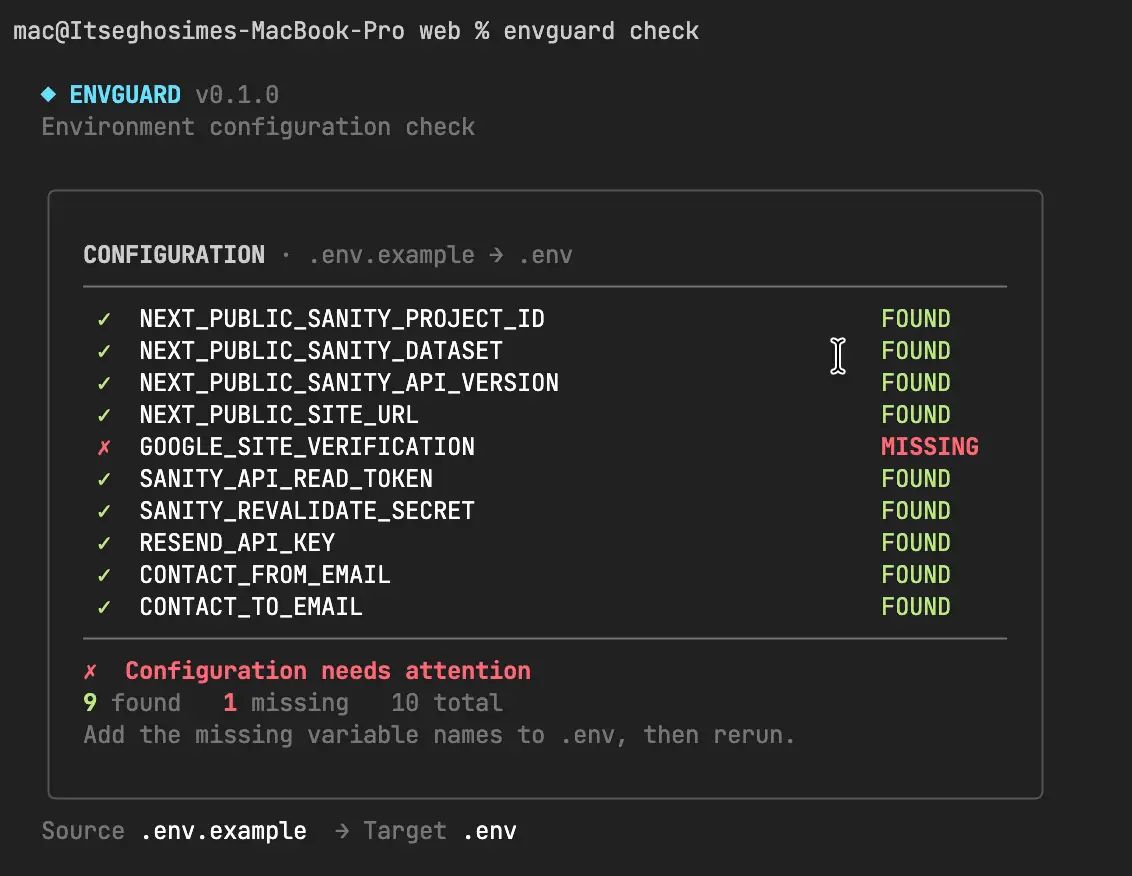
EnvGuard reads both files, parses their declarations and compares the configuration keys. It produces a readable terminal report showing present and missing keys, alongside diagnostics for malformed declarations.
The tool supports standard KEY=value declarations and supported export KEY=value declarations. Its parsing handles quoted content, Windows-style line endings, Unicode and other tested edge cases.
Implementation
I built the CLI with TypeScript and Node.js and used tsup to produce the distributable package.
The implementation separates command handling, parsing, validation and terminal reporting. This keeps the comparison logic independent of its presentation and makes individual behaviours easier to test.
The CLI provides a check command, help and version options, colour-coded output and formatting that adapts to terminal width.
Protecting secret values
The report displays variable names and validation statuses rather than environment-variable values. Sensitive declaration values are also masked in diagnostics.
This allows developers to identify configuration problems without unnecessarily exposing secrets in terminal output or CI logs.
Testing and CI
The verified release includes 35 automated tests covering parser behaviour, validation and CLI execution, including integration tests against the compiled binary.
GitHub Actions builds the CLI before running integration tests and checks compatibility across Node.js 20, 22 and 24.
The CLI returns exit code 0 for successful validation and informational commands, and 1 for validation failures or command errors, allowing it to be used in automated workflows.
Release and distribution
I published EnvGuard as @itseghosime/envguard on npm. It can be installed through npm or run through npx and requires Node.js 20 or newer.
The release workflow includes versioned Git tags, a changelog and GitHub releases.
Current scope
Version 0.1.1 validates whether required keys are present. It does not determine whether their values are non-empty, correctly typed or suitable for the application.
EnvGuard provides an early configuration check; application-specific validation remains a separate responsibility.
Findings & lessons
- 01
Small tools need clear boundaries
Separating parsing, validation and reporting made the CLI easier to test and allowed each module to focus on a specific responsibility.
- 02
Parsing requires more than simple splitting
Quoted content, exported declarations, line endings and malformed input required explicit handling and tests.
- 03
Useful diagnostics can protect secrets
Reporting variable names and statuses, while masking values in diagnostics, provides actionable feedback without exposing configuration secrets.
- 04
Test the distributed executable
Compiled-CLI integration tests check the command users actually run, extending coverage beyond individual functions.
- 05
Define what validation guarantees
Key presence does not prove that a value is valid. Documenting that boundary makes the tool’s results easier to interpret correctly.